Production Operations & Kubernetes
Operations 9 min read Kubernetes & Sizing Go 1.26 & Rust 1.98.1
Operating AeroStream in production is straightforward due to its lean memory footprint, lack of JVM Garbage Collection tuning, and native container cgroup awareness.
This guide outlines production hardware sizing, Linux system kernel tuning, operational commands, zero-downtime cluster draining, Kubernetes StatefulSets, and Prometheus observability.
1. Production Hardware Sizing
Thanks to Rust's zero-copy architecture and Go's Green Tea GC, AeroStream achieves high compute density and minimal idle memory overhead:
| Scale Tier | Throughput Target | Recommended CPU | Recommended RAM | Storage Configuration |
|---|---|---|---|---|
| Edge / Dev | Up to 50 MB/s | 1 – 2 vCPUs | 512 MiB – 1 GiB | Standard SATA / Cloud SSD |
| Standard Production | Up to 500 MB/s | 4 – 8 vCPUs | 4 – 8 GiB | Single NVMe SSD + Multi-Cloud Tiered Storage |
| Extreme Scale | 1,000+ MB/s | 16 – 32 vCPUs (Pinned) | 16 – 32 GiB | Dual NVMe RAID-0 + S3/GCS Tiered Storage |
2. Linux System Kernel Tuning
To achieve sustained multi-gigabyte ingestion and sub-millisecond tail latencies on bare-metal and cloud VMs, apply these kernel sysctl and subsystem configurations:
Virtual Memory & Page Cache Settings
# /etc/sysctl.d/99-aerostream.conf

# Max open file descriptors across the OS
fs.file-max = 2097152

# Increase maximum memory map areas (critical for high partition density mmap)
vm.max_map_count = 1048576

# Start background writeback early to prevent sudden dirty-page flush stalls
vm.dirty_background_ratio = 5
vm.dirty_ratio = 10

# Allow aggressive memory overcommit
vm.overcommit_memory = 1

# Disable swap to avoid unpredictable latency spikes
vm.swappiness = 1
Network Stack Tuning
# Maximum socket listen backlog queue
net.core.somaxconn = 65535
net.ipv4.tcp_max_syn_backlog = 65535

# Increase network device input backlog
net.core.netdev_max_backlog = 250000

# TCP buffer sizing: min, default, max (up to 16 MiB for 100 GbE networks)
net.ipv4.tcp_rmem = 4096 87380 16777216
net.ipv4.tcp_wmem = 4096 65536 16777216

# Enable TCP BBR congestion control and window scaling
net.ipv4.tcp_congestion_control = bbr
net.ipv4.tcp_window_scaling = 1
Apply immediately with:
Transparent Huge Pages (THP) & CPU Governor
For low-latency event streaming, configure THP to madvise (or never) to prevent background defragmentation stalls:
echo madvise | sudo tee /sys/kernel/mm/transparent_hugepage/enabled
echo madvise | sudo tee /sys/kernel/mm/transparent_hugepage/defrag
Set the CPU frequency governor to performance:
for cpu in /sys/devices/system/cpu/cpu*/cpufreq/scaling_governor; do
    echo performance | sudo tee $cpu
done
Storage Filesystem Mount Options
When mounting dedicated local NVMe drives for /data, use ext4 or xfs with noatime and nodiratime to eliminate metadata read-time write updates:
# /etc/fstab entry
UUID=xxxx-xxxx-xxxx  /data  xfs  noatime,nodiratime,logbufs=8,logbsize=256k,discard  0  2
3. Operational Administration Commands
AeroStream provides REST endpoints on port 9001 alongside a native CLI utility (./client/bin/client).
Topic Operations
# 1. Create a topic with 6 partitions and replication factor 2
curl -X POST http://localhost:9001/api/topics \
  -H "Content-Type: application/json" \
  -d '{"name": "payments.eu", "partitions": 6, "replication_factor": 2}'

# 2. List all cluster topics
curl -s http://localhost:9001/api/topics | jq

# 3. Inspect specific topic partition layout and ISR assignments
curl -s http://localhost:9001/api/topics/payments.eu | jq

# 4. Delete topic
curl -X DELETE http://localhost:9001/api/topics/payments.eu
Broker Discovery & Cluster Health
# Query active cluster leader and broker membership
curl -s http://localhost:9001/api/cluster | jq

# List all registered storage brokers and their reported storage capacity
curl -s http://localhost:9001/api/brokers | jq
Consumer Group & Lag Monitoring
# List all active consumer groups
curl -s http://localhost:9001/api/consumer-groups | jq

# Inspect consumer lag per partition
curl -s http://localhost:9001/api/lag | jq
Client Quotas Configuration
# Enforce 50 MB/s produce rate and 100 MB/s consume rate for client 'analytics-engine'
curl -X POST http://localhost:9001/api/quotas \
  -H "Content-Type: application/json" \
  -d '{
    "client_id": "analytics-engine",
    "producer_byte_rate": 52428800,
    "consumer_byte_rate": 104857600
  }'
4. Graceful Cluster Draining & Zero-Downtime Maintenance
When scaling down a cluster or decommissioning a broker node for kernel upgrades, abruptly killing the process causes transient consumer disconnections and emergency leader elections.
AeroStream provides Automated Partition Draining:
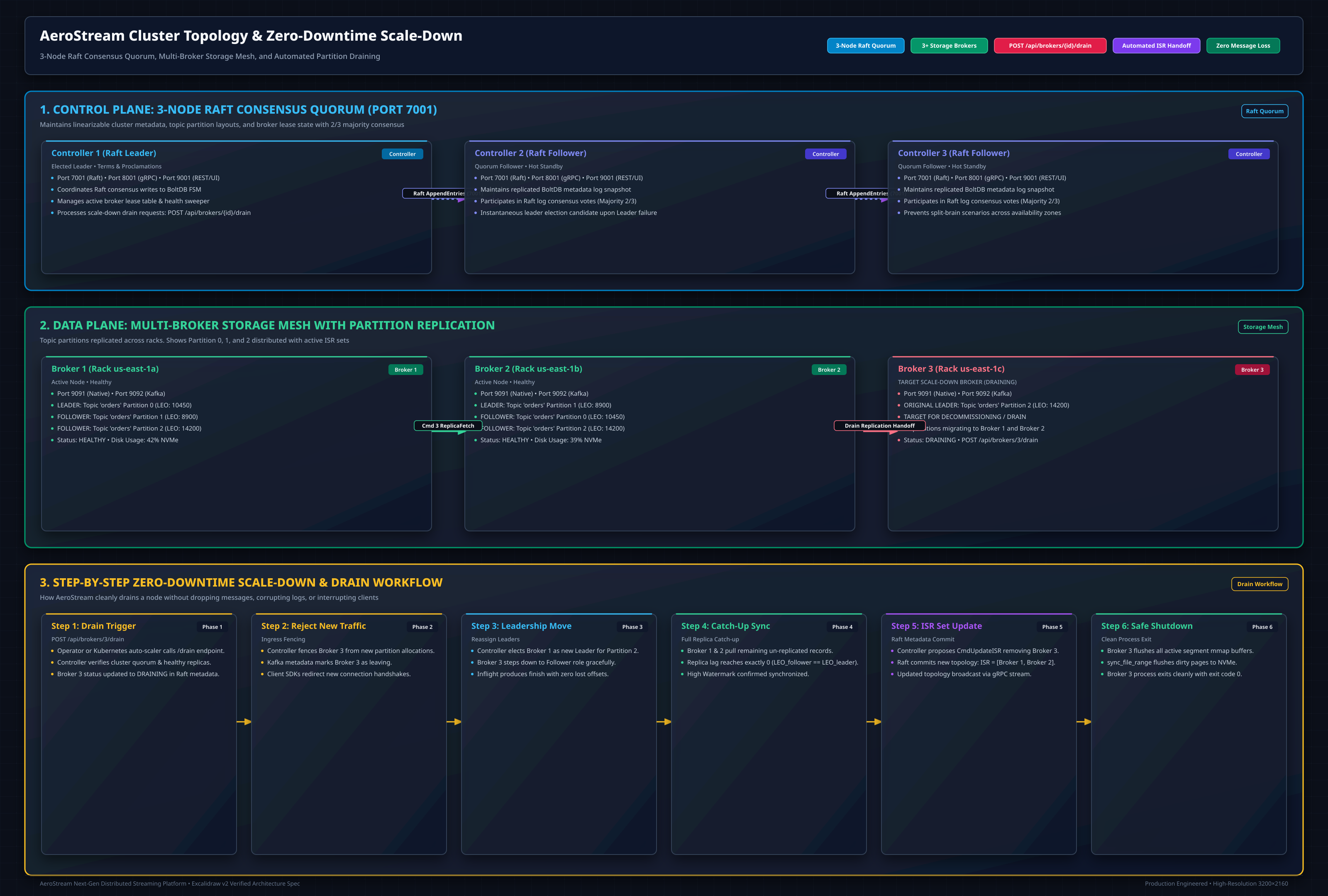
Step-by-Step Draining Workflow
- Trigger Broker Drain via REST:
- Controller Action:
- Proposes
CmdDrainBrokerinto Raft consensus. - Reassigns leadership of all partitions hosted on Broker 1 to surviving In-Sync Replicas (ISR).
- Allocates replacement replicas on healthy nodes.
- Evicts Broker 1 from active partition ISRs.
- Verify Drain Completion:
- Safe Termination:
Once partition reassignment is confirmed, the broker process can be stopped safely via
SIGTERMor Kubernetes pod eviction.
5. Kubernetes Deployment & StatefulSets
Deploying via Official Helm Chart (OCI Registry)
AeroStream is published as an OCI Helm chart to GitHub Container Registry (ghcr.io). Deploying into any Kubernetes 1.25+ cluster requires no extra repository configuration:
# Production install: 3 Raft controllers + 3 Rust storage brokers with persistent volumes
helm install aerostream oci://ghcr.io/gradientgeeks/charts/aerostream \
  --version 0.1.0

# Dev / Single-Node Profile (Kind / Minikube):
helm install aerostream oci://ghcr.io/gradientgeeks/charts/aerostream \
  --version 0.1.0 \
  -f https://raw.githubusercontent.com/gradientgeeks/aerostream/main/deploy/helm/aerostream/values-dev.yaml

# Inspect all configurable values:
helm show values oci://ghcr.io/gradientgeeks/charts/aerostream --version 0.1.0
Manual StatefulSets & PreStop Hook
If deploying via raw Kubernetes manifests, run AeroStream as a Kubernetes StatefulSet backed by persistent volume claims (PVCs) for local NVMe storage:
apiVersion: apps/v1
kind: StatefulSet
metadata:
  name: aerostream-broker
  namespace: aerostream
spec:
  serviceName: aerostream-headless
  replicas: 3
  selector:
    matchLabels:
      app: aerostream-broker
  template:
    metadata:
      labels:
        app: aerostream-broker
    spec:
      containers:
        - name: broker
          image: quay.io/gradientgeeks/aerostream:latest
          ports:
            - containerPort: 9091
              name: native-tcp
            - containerPort: 9092
              name: kafka-wire
            - containerPort: 9001
              name: http-rest
            - containerPort: 8001
              name: grpc
            - containerPort: 7001
              name: raft
          resources:
            requests:
              cpu: "2"
              memory: "2Gi"
            limits:
              cpu: "4"
              memory: "4Gi"
          lifecycle:
            preStop:
              exec:
                command:
                  - "/bin/sh"
                  - "-c"
                  - "curl -s -X POST http://127.0.0.1:9001/api/brokers/${HOSTNAME##*-}/drain && sleep 10"
          volumeMounts:
            - name: data
              mountPath: /data
  volumeClaimTemplates:
    - metadata:
        name: data
      spec:
        accessModes: ["ReadWriteOnce"]
        storageClassName: nvme-storage
        resources:
          requests:
            storage: 200Gi
6. Prometheus Observability & Health Checks
AeroStream exposes standard Prometheus metrics at http://localhost:9001/metrics.
Key Performance Indicators (KPIs)
aerostream_produce_messages_total: Cumulative count of ingested messages by topic and partition.aerostream_produce_bytes_total: Total ingress volume in bytes.aerostream_fetch_bytes_total: Total egress volume served viasendfile(2).aerostream_active_connections: Current active TCP client connections across ports 9091 and 9092.aerostream_raft_leader_status: 1 if the current node is the elected Raft leader, 0 otherwise.aerostream_segment_roll_duration_seconds: Time taken to seal and roll segment files.aerostream_tiered_storage_upload_duration_seconds: Time taken to offload closed segments to cloud object storage.